Release date: April 16, 2026
This release aims to simplify how the availability of learning items works in Journeys, making it clearer when content is scheduled. It also improves how learners move through journeys, standardises how scheduled items and dates are displayed, and strengthens live event flows, notifications, and reporting. The goal of this release is to reduce configuration overhead for admins while giving learners a more consistent experience.
TABLE OF CONTENTS
1. Simplified scheduling in Journeys
Scheduling fields on Sections and Live events have been removed from the journey configuration view. The manual unlock modal for all learning items is no longer available.
Item scheduling now follows one consistent set of rules across the product, removing exceptions previously caused by manual unlocks or section schedules. This aims to make it clearer when content is available and to reduce overlapping rules.
For learners:
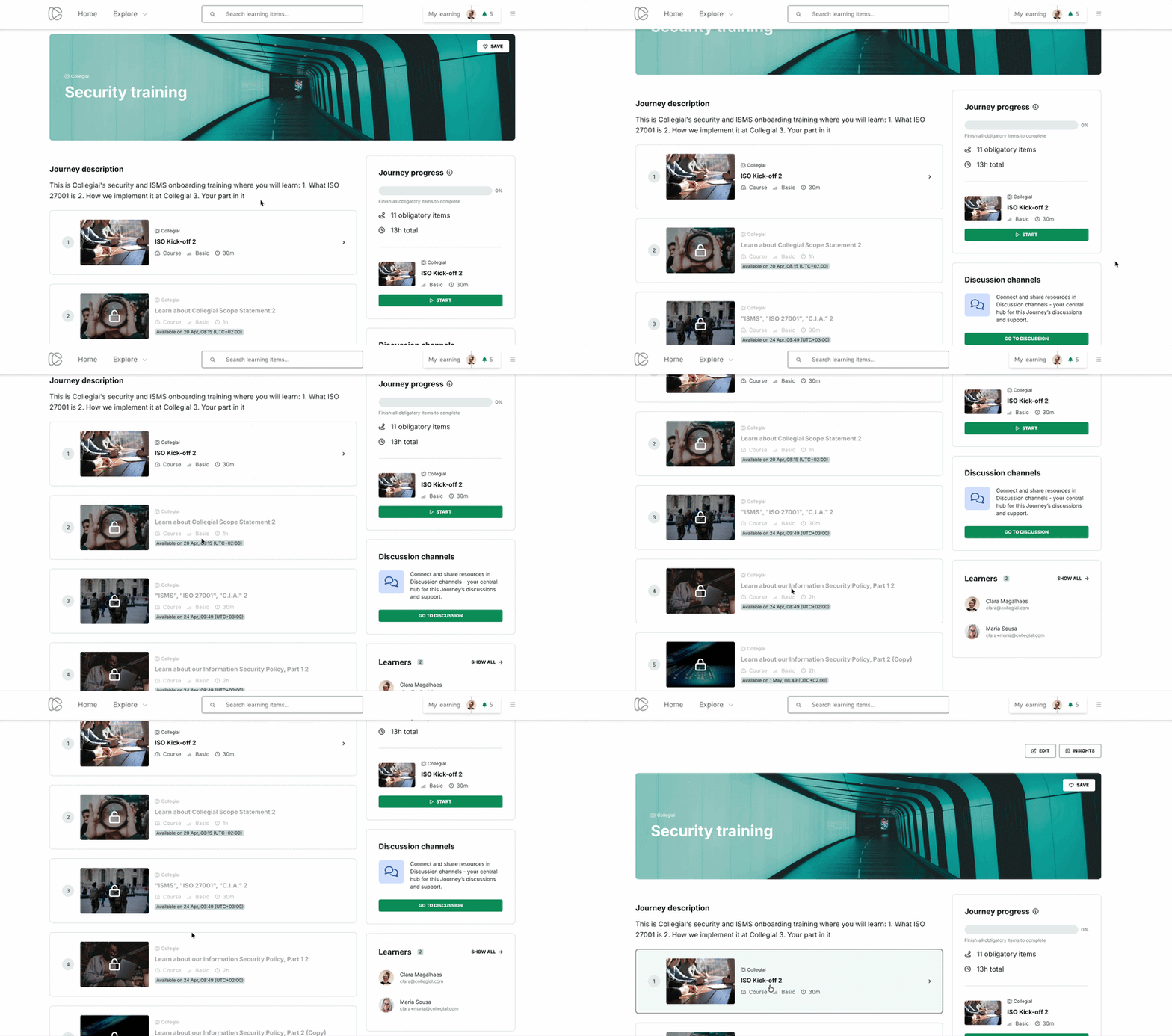
- When a learning item is scheduled, learners still see it in the journey outline and inside sections, but it is disabled and shows a lock icon and an “Available on” badge with the scheduled date.
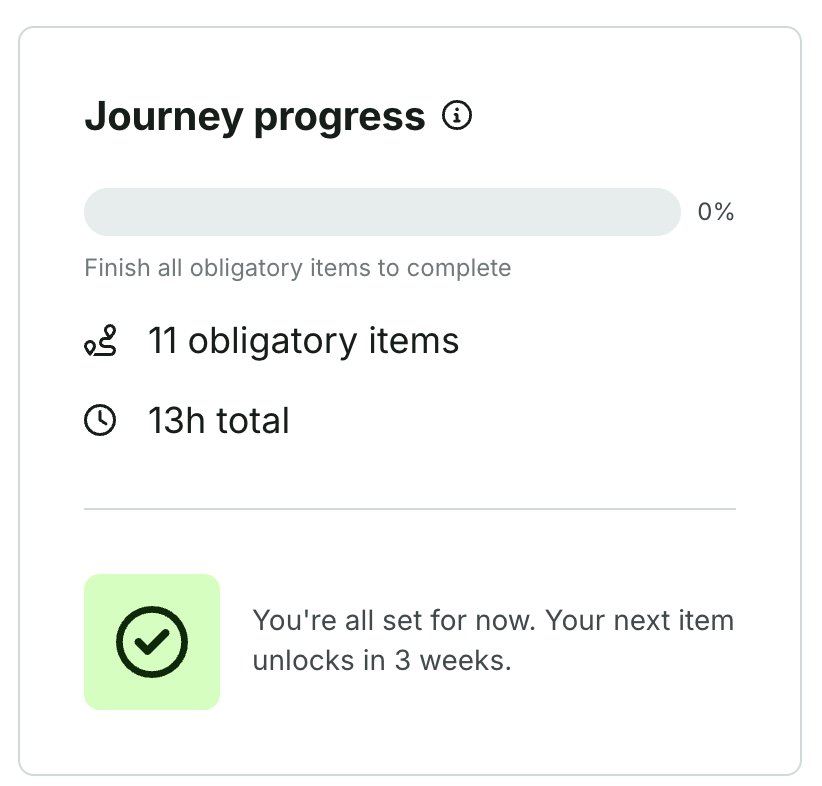
- In the Journey progress box, if all upcoming items are scheduled, learners see a waiting message such as “You’re all set for now. Your next item unlocks in 2 weeks”, along with the relative unlock timing.
- When an item unlocks, the “Available on” badge is removed for learners so they only see the standard, available item.
For admins:
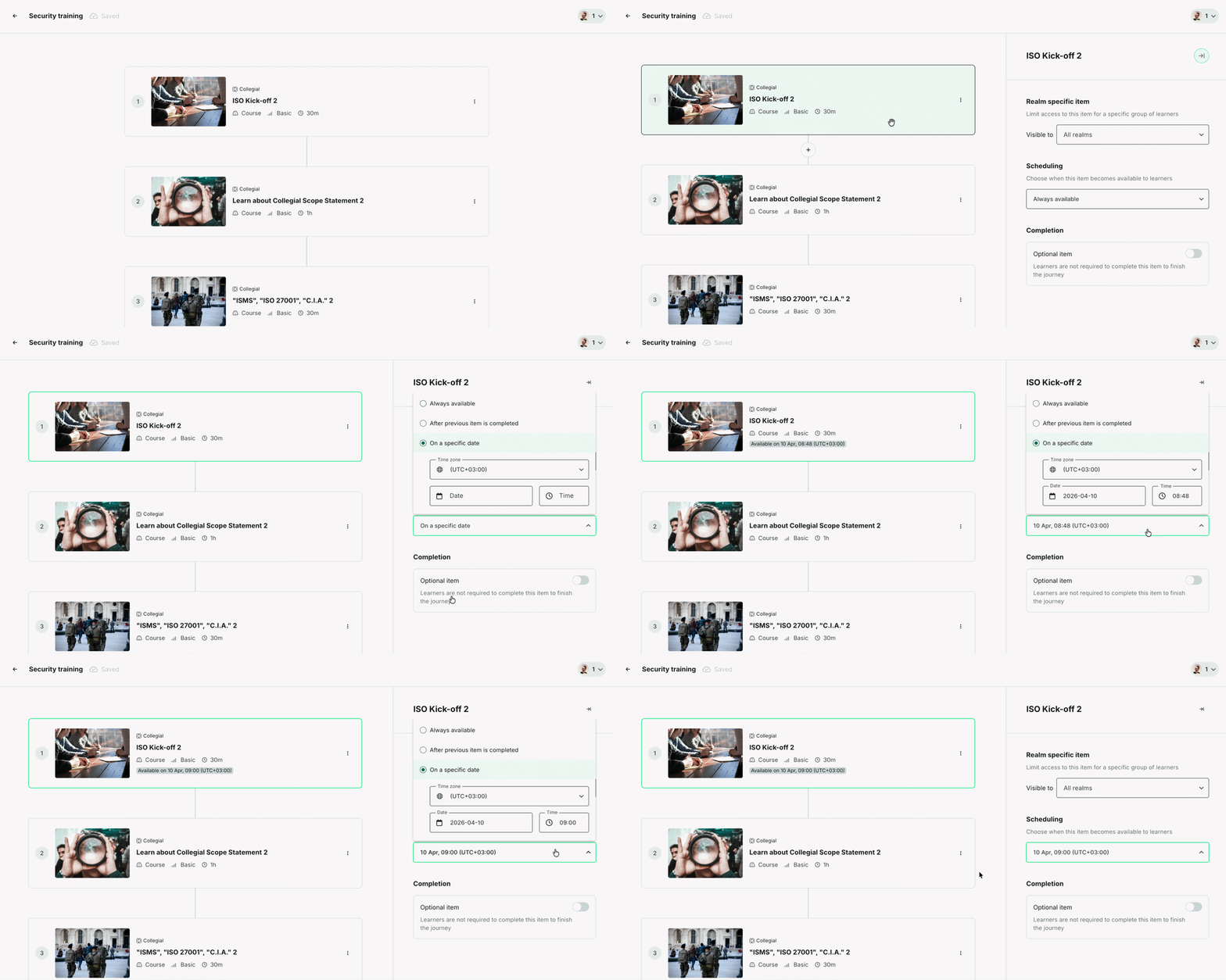
- To schedule a learning item as an admin
- Go to the journey edit page.
- Click Edit learning items.
- Click on an item card — a panel will appear on the right.
- Go to the Scheduling section.
- Choose an availability option from the dropdown:
- Always available — the item is accessible as soon as the learner joins the journey.
- After previous item is completed — the item unlocks once the learner completes the item above it in the journey.
- On a specific date — the item becomes available at a set date and time. When selecting this option, also choose the time zone, date, and time the item should become available to learners.
- In the admin views, the “Available on” badge is kept for easy reference to when the item is or was scheduled.
2. Improvements
Since the February 2026 release, we've also improved the following:
Date and time
- Standardised date and time formatting across the platform. Two formats are now applied consistently:
Learner-facing cards and listings — format: 25 Dec 2026, 09:00 – 10:00 (UTC+02:00).
Admin and Manager tables — format: 2024-12-25 · 09:00 – 10:00 (ISO 8601-style)
- Fixed missing years on webinar and seminar cards for both learners and admins.
Copy and terminology
- Renamed "Required" to "Obligatory" in learning journeys.
- Renamed the "Mark attendance" button to "Insights" for all admin roles in the Live event pages.
Journeys and content management
- Sessions can now be configured in the same flow as other journey settings during creation.
- Items in the journey outline now include controls to move them out of sections and back to the main journey list.
- Added tooltips that display full text for truncated titles and spaces in journeys and content tables.
- Improved handling of learner selection in the Learners tab so it now keeps the current selection stable instead of unexpectedly clearing previously selected learners.
Infrastructure
- Improved the mailing service.
Sunset features
- Removed the “What will you do next?” page from courses, so courses now end when all required pages are completed, and related data is no longer shown in Course Insights. This aims to streamline the learner experience and reduce friction in blended learning journeys that mix partner content (e.g Coursera and Pluralsight) with courses built with Collegial authoring tool.
Learner navigation and progress
- Journey progress now updates based on individual items within a section, instead of only when an entire section is completed. This gives learners and admins a more accurate view of progress as learners move through the journey. Read more here.
- The journey overview updates automatically when learners return from a learning item
3. Bug fixes
Since the February 2026 release, we've also resolved the following:
Journey setup and structure for admins
- Fixed an issue where duplicating a journey did not copy learning items inside sections.
- Fixed an issue where journey duplication did not preserve the order of learning items.
- Fixed an issue preventing removal of the last participant from a learning journey.
- Fixed Live Event insights so breadcrumbs now show section context, making it clear where a particular event sits within a journey.
Journeys and sections experience for learners
- Fixed missing loading states when section items were being fetched.
- Fixed incorrect routing when learners pressed the back button from within sections.
- Fixed an issue where Journeys was not accessible to learners.
- Fixed multiple issues where journey progress did not update or reach 100% when expected.
- Fixed a missing team member icon in the "My team" channel.
Live Events
- Fixed navigation to Live events from journeys.
- Fixed cases where learners could access Live event pages without having joined the journey.
- Fixed cases where Live events links were displayed out of frame, causing an overlap between the interface components.
- Fixed issues that sometimes prevented removing a Live event from the journey outline.
- Fixed cases where learners could see Live events details they were not meant to see, or access content before it was available to them.
- Fixed a time mismatch on section event cards.
- Fixed an issue where clicking "Create Live Event" immediately inserted the event into the journey outline without saving, even if the user cancelled or navigated away.
Navigation and UI
- Fixed a floating back button in Courses that overlapped content when left navigation is collapsed by the user.
- Fixed redirect behaviour, which was causing learners to land on a page other than the intended one.
- Fixed confusing cursor behaviour and outlines around downloadable files in Courses.
Was this article helpful?
That’s Great!
Thank you for your feedback
Sorry! We couldn't be helpful
Thank you for your feedback
Feedback sent
We appreciate your effort and will try to fix the article