TABLE OF CONTENTS
Learning journeys feature the following support for learners:
Join Requirement in Journeys
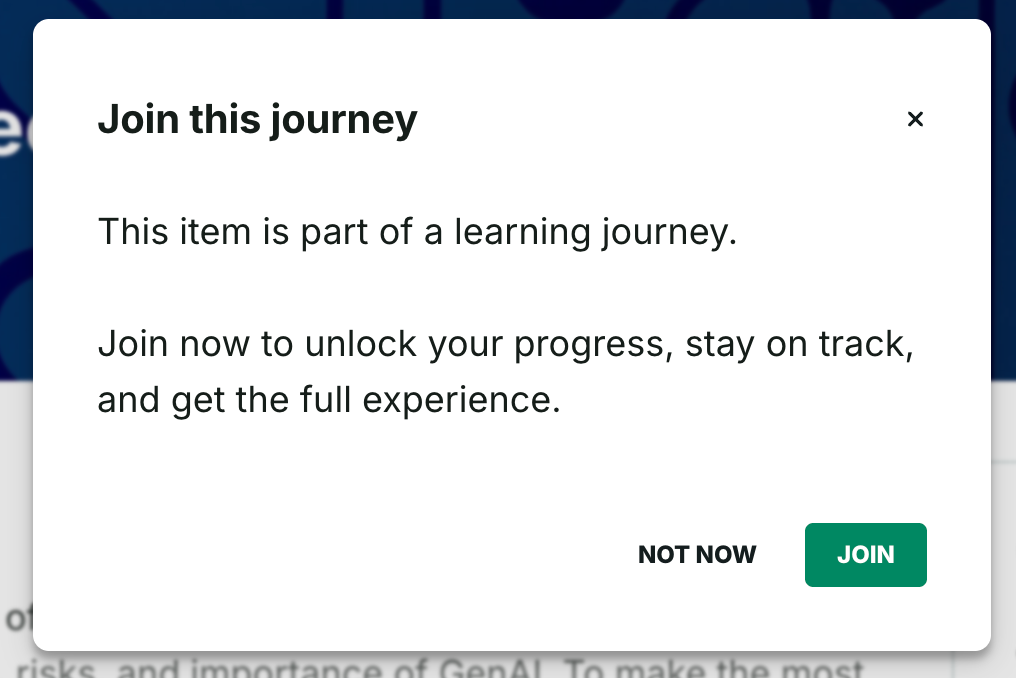
In order for Collegial to effectively track a learner's progress in a given journey, learners must actively join Journeys in order to consume their content. This also aims to ensure learners receive consistent guidance.
How it works
- When a learner attempts to engage with a Journey item while not joined, they’re prompted to Join.
- After joining, the progress bar, next-step prompts, and event reminders activate for that learner.
Journey Progress Visualization
The progress bar section aims to give learners immediate orientation as per the below features, so that momentum is more easily maintained:
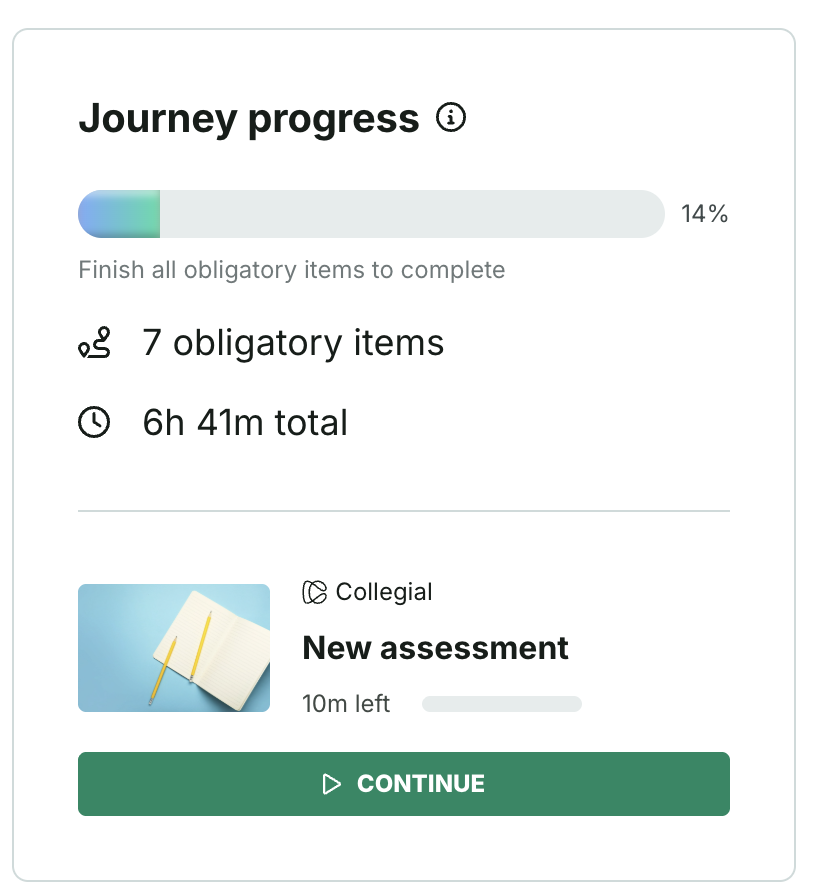
The progress bar reflects either one of two Journey completion rules, as configured by its Admin in the Journey settings:
- Finish all obligatory items to complete
- When this is the option configured by the admin, as in the above screenshot, the obligatory item count (7) and remaining estimated time (6h 41m) to complete the totality of said obligatory items are indicated.
- Example: there's a journey with 10 items including 2 optional ones.
- A learner that completes the 8 obligatory items, but none of the optional ones, will see its journey progress set to 80%. The journey will be marked as completed.
- A learner that completes the 8 obligatory items as well as the 2 optional items, will see its journey progress set to 100%. The journey will be marked as completed.
- A learner that completes 7 obligatory items and 2 optional items, will see its journey progress set to 90%. The journey won't be marked as completed.
- Invest X hours to complete; this means that Admins set the hours target at the Journey level. Learners can invest those hours in any obligatory learning items.
- When this is the option configured by the admin, the following is indicated: [Remaining estimated number of hours obligatory], [Obligatory items across which said number of hours are considered], [Total number of hours to complete, regardless of how many have already been invested]. Note: if the learner ends up spending more time taking the journey than the target hours set by the Admin, then that additional time is not reflected here.
- Note that time spent in optional items does not count toward completion. Example: there's a journey with 10 items, including 2 optionals requiring 10h to complete:
- A learner that has invested 5h will have progress = 50%. The journey won't be marked as completed.
- A learner that has invested 10h will have progress = 100%. The journey will be marked as completed.
- A learner that has invested 11h will have progress = 110%. The journey will be marked as completed.
- Finish all obligatory items to complete
- The exact next step to take - start, or continue if the learner has already begun taking the journey.
- The system updates progress and time estimates as learners complete activities; on completion, the bar shows 100% and the completion date displays inside the progress container.
- Please note that in most cases, the progress bar updates occur within a few seconds, but occasionally takes longer. If delayed by more than 15 minutes, please report a bug.
Upcoming Events Container in Journeys
The Upcoming event container aims to keep time-sensitive sessions visible to learners as they navigate content, so that they can plan for and attend it without losing track of their current flow.

Note that the container only displays when a live event exists. The container visualizes the date, time and location (when applicable) in order to guide attendance.
Was this article helpful?
That’s Great!
Thank you for your feedback
Sorry! We couldn't be helpful
Thank you for your feedback
Feedback sent
We appreciate your effort and will try to fix the article